
Integration
Sync Zoom meetings into SmarterMeetings
Zoom is where many client conversations happen. SmarterMeetings connects with OAuth, syncs your cloud recordings and transcripts, and organizes everything by client so follow-up doesn't depend on whoever remembers to forward the recap. For Zoom meeting notes in CRM, see our comparison of native Zoom vs SmarterMeetings.
- Secure OAuth connection to your Zoom account
- Sync transcripts and meeting metadata automatically
- Combine Zoom with Fathom, Teams, and other providers
- Extract and assign tasks from Zoom calls
- Log completed calls to Salesforce without re-keying

Sales and consulting teams often use Zoom for external calls while internal tools capture different meetings. SmarterMeetings normalizes that sprawl: one inbox, one task list, one place to see what's still unreviewed before the next client touchpoint.
Zoom meetings tagged to a client appear alongside Fathom or Fireflies recordings for the same account—giving partners a complete picture without opening five apps.
OAuth connection means your team authorizes once; transcripts and cloud recording metadata sync automatically on the schedule you set. Reps don't forward AI companion links—managers see the same meeting list and review status.
When a deal accelerates, filter open tasks from Zoom calls tied to that Opportunity, push the latest summary to Salesforce, and walk into the next Zoom with CRM and transcript context on one screen.
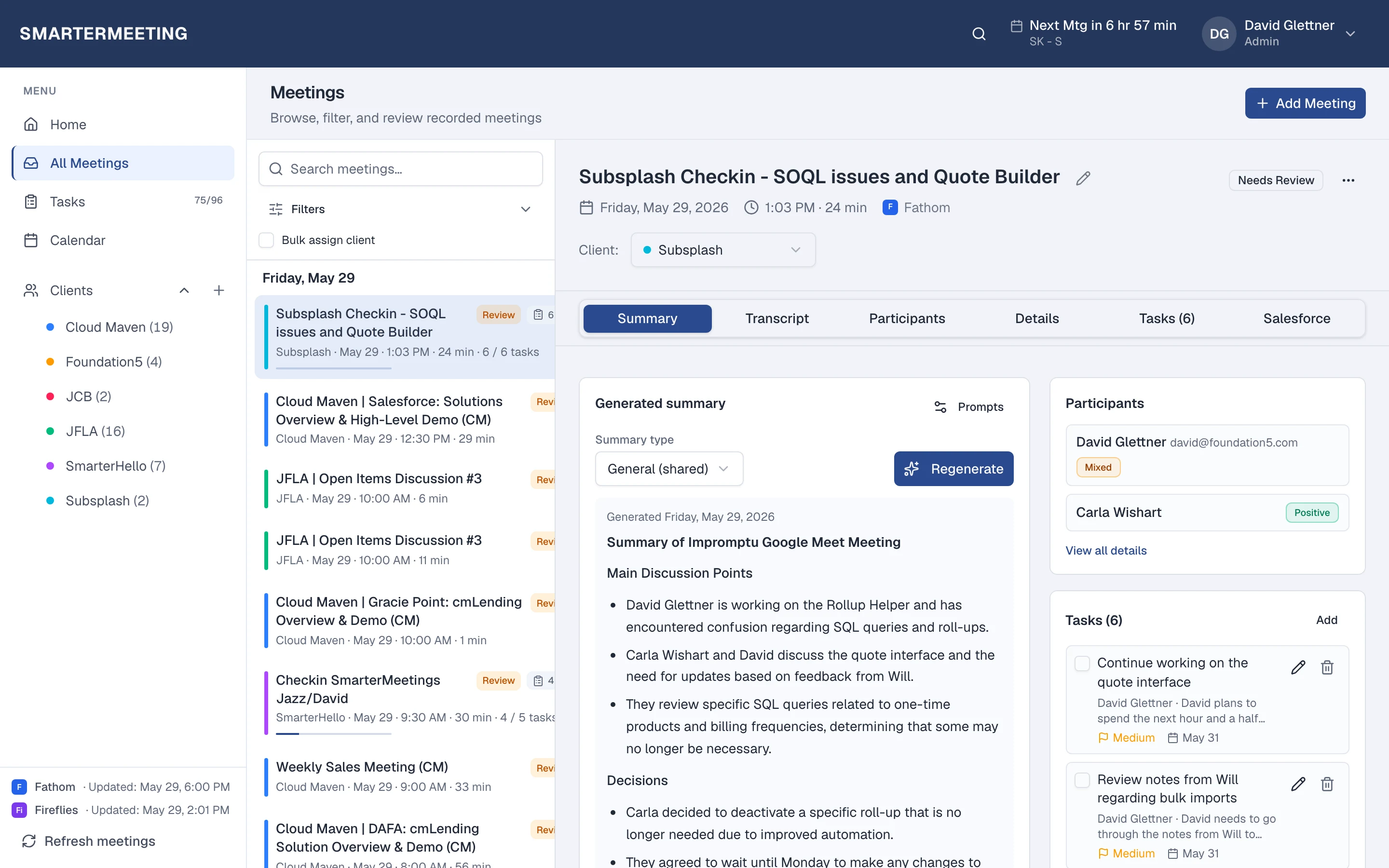
Zoom calls in your unified inbox · actual workspace
What you see after sync
Every Zoom meeting appears in the same list as your other providers—with transcript, summary, tasks, and client tags on the detail panel. Filter by provider when you want only Zoom, or by client when you need the full account story across every recorder your team uses.
Review status shows partners which calls still need a pass before the next engagement. Open tasks roll up to the home dashboard so Monday prep isn't a scavenger hunt through forwarded recap links.
Explore all features →Zoom meeting notes for CRM: See Zoom vs SmarterMeetings for CRM logging for how native Zoom notes compare to a unified inbox with Salesforce sync.
Wondering how Zoom alone compares to adding SmarterMeetings? Read: Zoom vs SmarterMeetings →
Related integrations
Related guides
Frequently asked questions
- Do I keep using Zoom?
- Yes. Zoom continues to capture and summarize your calls. SmarterMeetings syncs those meetings into one workspace for client tags, tasks, and review—without replacing your recorder.
- How often does Zoom sync?
- You choose a schedule (weekday business hours by default) or click Refresh meetings anytime after connecting in Settings.
- Which SmarterMeetings plan do I need?
- All plans include multi-provider sync and tasks. Personal Pro and Team add Salesforce logging when you need CRM push from synced meetings.
- Can I push Zoom meetings to Salesforce?
- Yes, on Personal Pro and Team plans. Link records from the meeting detail, review AI-suggested field updates, and push summaries without copy-paste.