
Agency principals & delivery leads
Turn client recordings into follow-up your agency can hand off
Multi-client chaos ends when every external call lives in one inbox—tagged by client, marked reviewed, and tied to tasks your delivery team actually completes.
Start free trial
Monday prep when three clients need steering committees
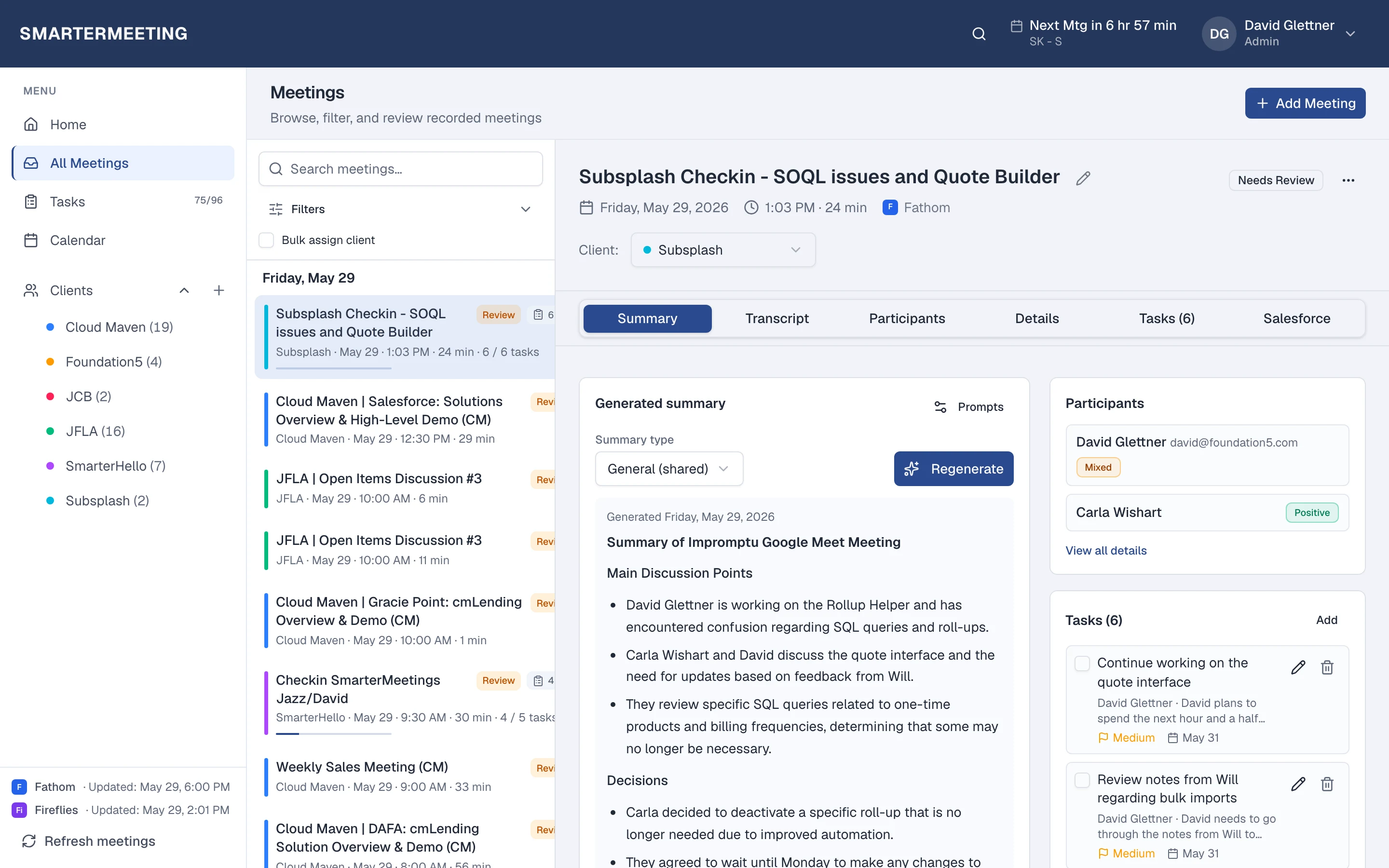
Your delivery lead opens Home and filters unreviewed calls from last week. Acme Design Co has four external meetings spread across Fathom and Zoom—each already synced with transcripts and provider summaries. She tags the two that were missed, extracts three tasks from the renewal call, and marks everything reviewed before the partner walks in.
The partner doesn't ask anyone for links. They open the Acme client view and see every Q1 conversation—discovery, delivery check-ins, and the renewal—in one timeline. When the PM who owned the account went on leave, nothing disappeared into a personal recorder account.
That is the operational difference: client context lives in the workspace, not in inboxes. Agencies that standardize follow-up here recover billable hours that used to go to recap archaeology.
The problem
- Client calls spread across personal Fathom accounts and forwarded recap links
- New PMs can't find last quarter's decisions before the next steering committee
- Partners can't see which calls still need tags, tasks, or internal sign-off
Record (Fathom, Zoom, etc.)
Keep your notetaker
Sync to inbox
Scheduled or on demand
Tag client
Bulk assign when clearing backlog
Review & tasks
Skim, extract, mark reviewed
CRM (optional)
Salesforce on Pro/Team
Follow-up before and after a unified workspace
Before
- Client calls split across personal Fathom accounts and forwarded recap emails
- New PMs rebuild context from Slack threads before every steering committee
- Partners can't tell which calls still need tags, tasks, or sign-off
- Sales and delivery maintain parallel note systems when CRM is involved
After SmarterMeetings
- Every provider syncs into one inbox with client tags and review status
- Client view shows the full engagement timeline across recorders
- Weekly review queue on Home gives partners lightweight QA
- Optional Salesforce push on Pro/Team when hybrid delivery + sales share accounts
How teams use SmarterMeetings
1. Sync every recorder your teams already use
Connect Fathom, Zoom, Meet, Fireflies, and more. Multiple accounts per provider are supported when practices run separate workspaces.
2. Tag external calls to clients
Bulk-assign from the meeting list when clearing backlog. Client view aggregates meetings and tasks for the full engagement story.
3. Run a weekly review queue
Home surfaces unreviewed calls. Mark reviewed when tags and tasks are committed—lightweight QA partners can trust.
4. Optional Salesforce for hybrid delivery + sales
When the same firm runs delivery and new business, push approved summaries to CRM on Pro/Team plans without a parallel note system.
Typical stack
Most teams in this role already pay for capture and CRM—the gap is follow-up between them. SmarterMeetings sits in that layer without replacing tools your clients or reps already use.
- Fathom or Fireflies
- Zoom or Google Meet
- SmarterMeetings
- Salesforce (optional)
Common objections—and how teams answer them
- “We already pay for Fathom—why add another tool?”
- You keep Fathom for capture. SmarterMeetings is the follow-up layer: client organization, tasks, review queues, and handoffs. Most agencies already lose more margin to scattered follow-up than the subscription costs.
- “Our clients use different video tools—we can't standardize.”
- You shouldn't force one recorder. Connect up to ten providers; enforce one follow-up workflow in SmarterMeetings instead.
- “Partners won't adopt another dashboard.”
- Review status is a five-minute weekly skim—not a new meeting culture. Home surfaces unreviewed calls; marking reviewed is faster than chasing recap links.
Frequently asked questions
- Do we have to standardize on one meeting recorder?
- No. Clients and practice areas use different tools. SmarterMeetings syncs up to ten providers into one inbox with the same tagging and task workflow.
- How do handoffs work when an account lead leaves?
- Meetings and tasks stay tagged to the client in the workspace—not in someone's personal Fathom account. The next lead filters by client and reads full history.
- Which plan fits a small agency?
- Personal Starter works for solo principals; Team adds shared workspaces and seat billing when delivery pods grow. Add Pro or Team for Salesforce.
- How long until synced calls appear?
- First sync after connecting a provider usually completes within minutes. Scheduled sync runs during business hours by default, or use Refresh meetings anytime.
- Can we export meeting history for a client?
- Yes. Export and search across tagged meetings when you need archives for handoffs or compliance—without scraping personal recorder accounts.